How to use the Signal inbox
Wiki: Setup, edge and devices, Signal inbox and unclassified measurements
When to use this
Every tag a gateway captures is auto-created as a measurement the moment it’s first seen, but it starts life
unclassified, quarantined from every KPI, alert, and ML feature until a human tells the system what it
actually is. The Signal inbox (/grooming) is the global inbox for that backlog: every unclassified
measurement across every node in the tenant, in one fast, one-decision-per-row triage list. Use it whenever
the badge isn’t zero, the point is to work the backlog down before it grows into silent debt.
The badge
The Signal inbox card on Getting Started carries a live amber count of everything still unclassified
(GET /api/v1/signals/unclassified). No badge means the count is zero, every captured tag on the floor
already has a meaning.
Steps
- The Signal inbox has no nav entry of its own, reach it from the badged card on Getting Started, or go
directly to
/grooming.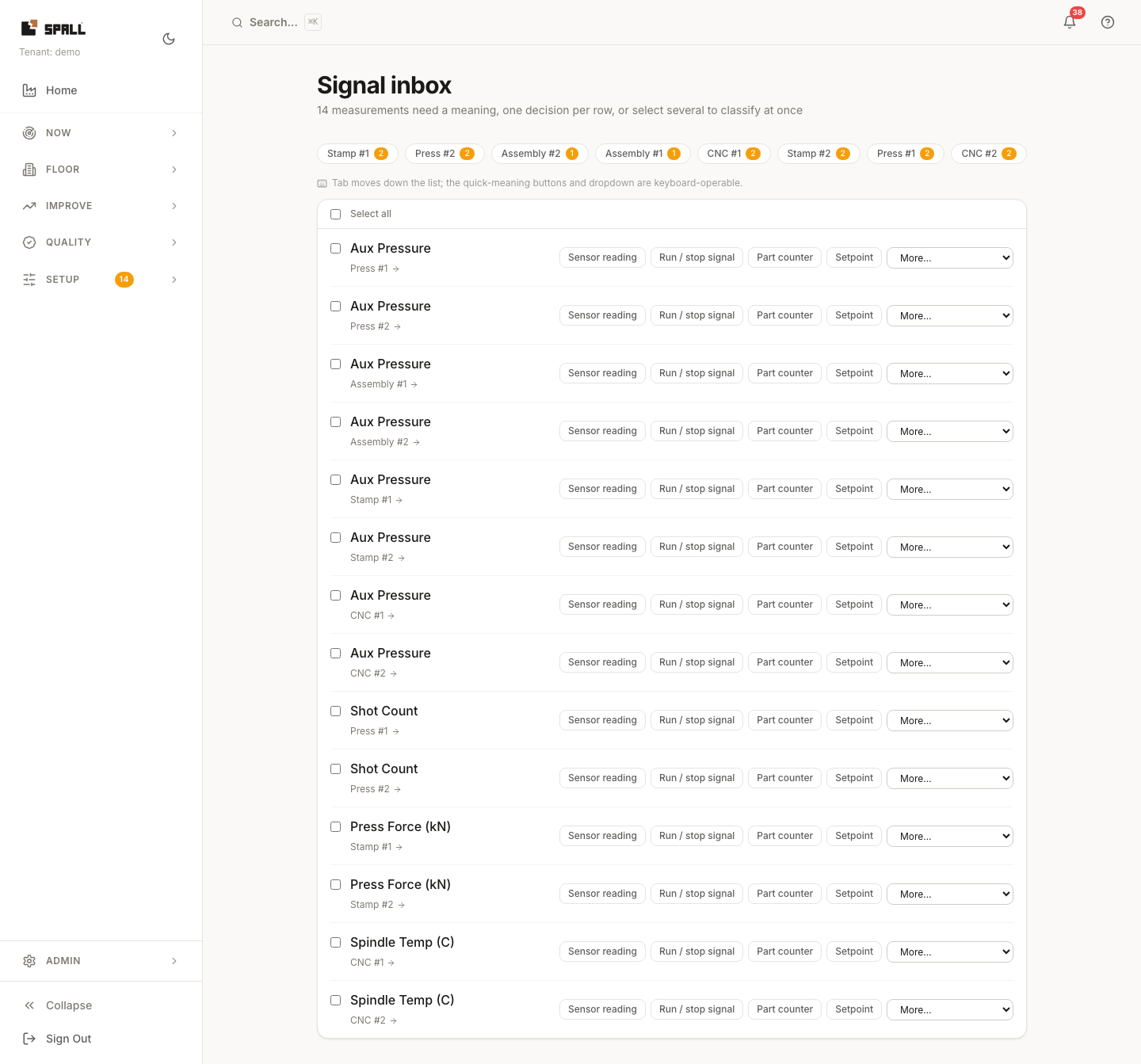
- If the backlog spans more than one node, a row of per-node chips sits above the list, each showing the node’s name and its own count, click one to jump straight to that node’s Measurements tab instead of scrolling to find it in the combined list.
- Work the list top to bottom, one decision per row. Each row shows the measurement’s name, its unit,
and a link back to its node. Two ways to classify it:
- Quick-assign buttons, the four meanings you’ll reach for most: Sensor reading, Run / stop signal, Part counter, Setpoint. One click and it’s done.
- More… dropdown, the rest of the meanings, grouped the same way as the node’s Measurements tab: KPI drivers (run/stop, part counter, cycle time, reject/scrap count, energy) and Setpoints & control (setpoint, process variable, control output).
- Select several rows with the checkboxes to classify them all at once with one meaning, the fast path when a whole PLC’s worth of freshly-captured tags share one meaning.
- The row flashes a checkmark with the meaning you picked, then drops out of the list a beat later. The inbox, that node’s Measurements tab, and the node’s KPI numbers all refresh together, nothing on screen is left reading stale after a classification.
- Tab moves down the list and every control (quick buttons, dropdown) is keyboard-operable, working a long backlog doesn’t require a mouse.
Why “derived” isn’t on the list
The dropdown never offers Derived (calculated) as a choice. A derived measurement isn’t a captured tag waiting to be labeled, it’s authored as an expression over other measurements, which only makes sense on the node itself, in the Derived group of its Measurements tab. If what you actually want is a calculated value, classify what it depends on here first, then add the derived measurement on that node.
Why it matters
Auto-create means Spall never makes you hand-configure every tag before it starts capturing data, but it also means a freshly-captured measurement is real data with no confirmed meaning yet, and it must never feed a KPI, an alert, or an ML model as if it did. That’s the point of the two-stage model: a quarantined signal is marked “needs a look,” not shown as a number you can already trust. Classifying a row isn’t paperwork on top of the real work, it’s the step that turns raw capture into a number worth trusting. The Signal inbox exists to make working that backlog down pleasant, so the quarantine clears instead of turning into a pile nobody ever gets to.
The zero-state
When nothing is left to classify, the Signal inbox shows “Everything on the floor has a meaning.”, not just an empty list, but a deliberate confirmation that the floor’s data is fully accounted for. As new tags get captured they queue back up here for a quick look, so this is a state you pass through repeatedly, not a one-time finish line.
Related
- Setup, edge and devices: Signal inbox and unclassified measurements, the concept page, including the node Measurements tab: the same classification action scoped to one node, plus an Advanced ▸ wiring disclosure (raw tag, gateway, source, scale/offset) that the Signal inbox leaves out to keep triage fast.
- How to manage gateways: the gateway home, a source’s own tag list carries a related but separate idea, each tag’s role (setpoint, process variable, load, and so on), which the AI layer can now suggest from the shape of the readings themselves. That role feeds the AI layer directly. It is not the same as the meaning you pick here in the Signal inbox.
- How to set up products, routings, and targets, classifying a measurement is one rung on the fidelity ladder: bring what you have and the system grades what it can, and more configuration (a real routing target, a real product cost) buys more fidelity on top of a fully classified node.
- How to run tag discovery, discovery is for candidate tags you haven’t committed to yet. The Signal inbox is for tags the system already captured, just not yet given a meaning.
- Setup, edge and devices (overview)