How to run the maintenance repair loop
Wiki: Floor concepts, Maintenance, MTTR, MTBF
When to use this
You’re a maintenance tech or admin working stops from the floor and want to close out repairs with minimal taps, mobile-first.
Steps
- Click Maintenance in the sidebar (
/maintenance). - Check the header: MTTR, MTBF, and repairs closed for the current window. MTBF counts genuine
failures only, an actual breakdown or a stop with a repair opened against it, not an ordinary jam or
other minor stop. Either reliability metric shows an em-dash instead of a made-up number when there
isn’t enough data to compute it.
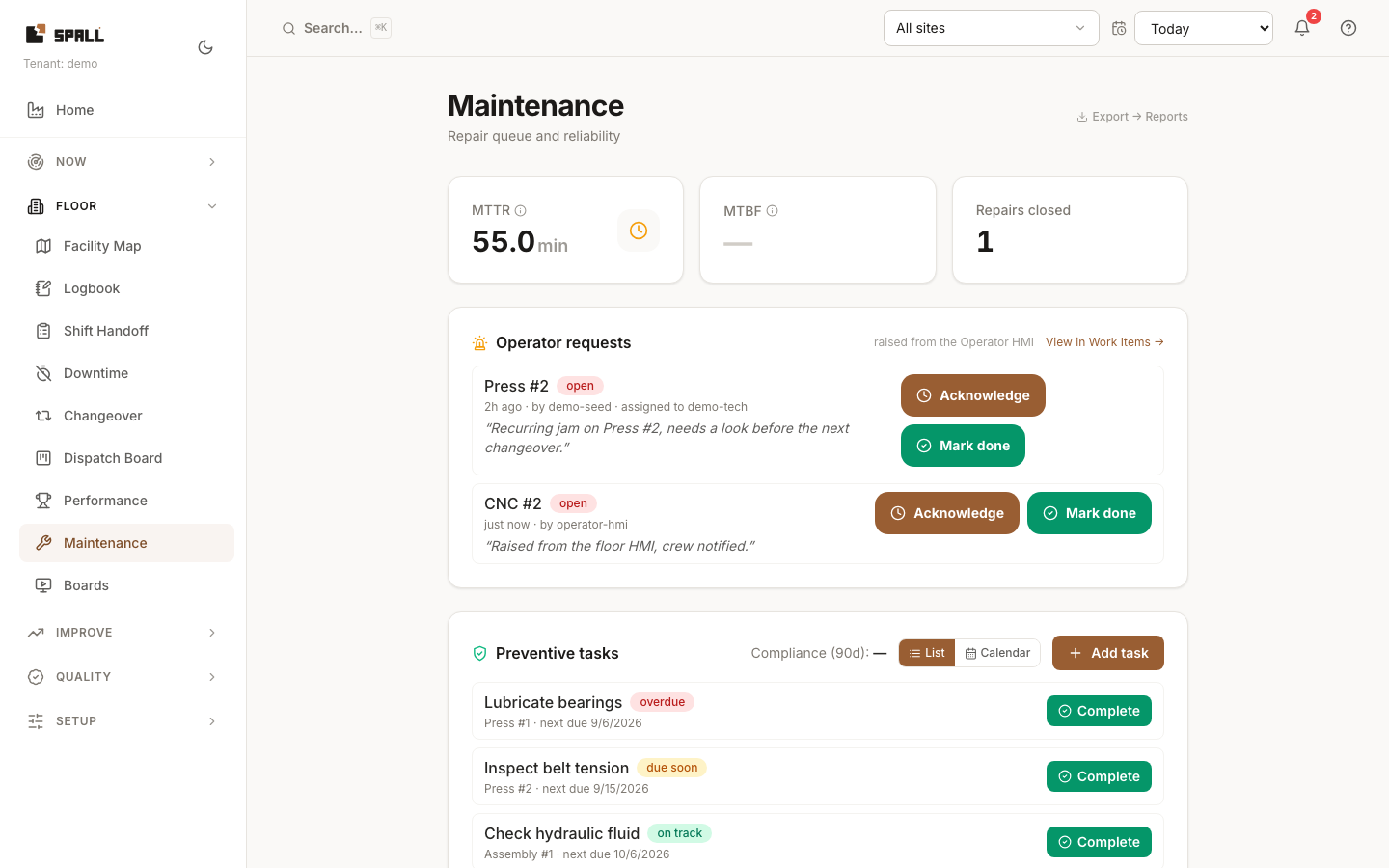
- Work the queue top to bottom, it lists recent stops needing action. By default it shows only
repair-worthy stops, an actual breakdown or a stop that already has a repair opened against it, so a
floor full of half-minute uncoded jams doesn’t bury the ones that need a tech. Check Show every stop
to see everything in the window, including the short stops it hid. Those stay visible on the
Downtime Pareto either way. Each stop moves through a
three-step lifecycle, one button per state:
- new → tap Acknowledge
- acked → tap Start repair
- in_repair → tap Resolve, and enter what fixed it, resolving needs a short resolution note, it’s not a single tap.
- If the same asset appears repeatedly in the queue, prioritize it, a repeat offender is where MTBF-focused work pays back fastest. A “MTBF degrading” badge flags this automatically.
- Check Operator requests for issues raised from a station’s Help tile out on the floor (category Maintenance), acknowledge one to assign it, or mark it done directly.
- Check Preventive tasks for cadence-driven PM work (a due list or a due/overdue/completed calendar), separate from the downtime-driven repair queue above. This isn’t a full CMMS, so there’s no parts tracking or routing.
- Check the Failure risk (next 7 days) panel for a statistical (non-LLM) next-failure risk estimate per asset, drawn from that asset’s own 90-day failure history, to get ahead of a stop before it happens. It counts genuine failures only, an actual breakdown or a stop with a repair opened against it, never every stop in the queue, so an asset with too little failure history reads “not enough failure history” instead of a guess. The dollar exposure next to each risk reading is priced at that asset’s own configured rate where one is set, and says so when it falls back to a default instead.
Notes
- If an action call fails, the queue rolls back to its previous state so a tech never acts on a false status.
- This same downtime data feeds the Downtime Pareto and Shift Handoff.
- A repair can also originate as a
repair-kind Work Item, see How to manage Work Items (incidents, andon, repairs) for that broader view, this page is about working the Maintenance queue itself at/maintenance.
Related
Compliance needs at least three due occurrences in the last 90 days and a measurable day or cycle schedule. Until then the task explains that there is not enough history. Each task also states whether it creates a work item when overdue. This is the task’s existing opt-in setting. Adding a preventive task does not automatically enable it.