Most job shops don’t run a formal work order for everything a machine makes. Not because they’re disorganized, because a lot of what runs through a machine on a given day doesn’t need one. A five minute setup to burn through leftover stock, a prototype cut for engineering, a rerun of last week’s part because the first batch had a hold on it, none of that has a customer due date attached, and forcing it through the same process as a real job just teaches people to skip the process.
The mistake is treating that as a binary choice: either every job gets a work order, or the shop tracks nothing at all. There’s a middle path, and it’s worth understanding on its own terms before you decide which of your jobs actually need the full version.
The paperwork tax nobody budgets for
A real work order carries real weight for a reason: a part number, a due date, a quantity that has to reconcile against what shipped, sometimes a traveler that follows the job through every station. That weight is earned when a customer is waiting on it. It’s dead weight when the job is internal, and dead weight has a cost even when nobody’s counting it directly. A planner spends ten minutes keying in a job nobody’s tracking against a date. An operator hunts for a work order number that was never going to matter, or worse, picks whatever’s closest just to clear the screen, and now a real report has a phantom job attributed to it.
Multiply that ten minutes by every internal run in a month and it adds up to real planner time spent on paperwork that produces no actual insight, because nobody was ever going to check whether that job hit its due date. The due date didn’t exist.
What a lightweight designation actually needs
Strip a work order down to what you actually use it for on an internal run and you’re left with almost nothing: what product is this, and when did it start and stop. No target quantity. No due date. No customer reference. Just enough to attach the machine’s next few hours of data to a name instead of leaving it unlabeled.
Spall’s What’s-running flow is a clean example of what that stripped down version looks like in practice. On a claimed station, the Job tile carries a What’s running prompt, front and center if the machine has no scheduled job, a smaller link next to the job picker if it does. An operator searches for the product, taps it, and enters their PIN the first time, the same shared sign in used for logging good and scrap parts. From there the tile shows the product name with a Logged from the floor label instead of a progress bar, because there’s no target to track against, just a running record of what the machine is making. Tap Change to switch products mid shift, tap End to say the machine isn’t making anything right now. That’s the entire operator side of it, three taps and a PIN, not a form.
On the admin side, a Logged from the floor entry shows up on the Jobs page right alongside scheduled work, filterable by Origin: Scheduled versus logged from the floor. It carries a dash where a target quantity would be, rather than pretending a number was ever set, and that’s deliberate. A made-up target is worse than no target, it invites someone to grade a job against a number that was never real.
When paperwork is worth it, and when it isn’t
The full work order earns its cost when a due date actually matters to someone, when a quantity has to reconcile against a shipment, or when a contract requires traceability back to a specific order. Anything customer facing, anything with a PO number behind it, put it through the real process, that weight is doing real work.
The lightweight path fits everything else: internal stock replenishment, engineering prototypes, tool proving runs, a quick repeat of a job nobody’s tracking against a schedule. A useful test is asking who upstream actually cares about the due date. If the answer is nobody, because there isn’t one, don’t make an operator pretend there is by forcing a work order form on a job that was never going to be late.
Closing the loop automatically
Typing a product name in every time still asks something of the operator, and on a machine that only ever runs a handful of recurring jobs, that repetition is exactly the kind of friction the whole idea is trying to avoid. If the machine’s control already reports its own program or recipe number on a tag, that number can drive the designation automatically, no tablet tap required.
The setup happens once per machine. On the Tags page, the tag carrying the program number gets its meaning set to Program tag. From there, Product Translations lists every value that tag has actually reported, each one showing an Unmapped offer badge until someone tells Spall which product it means, picked from a dropdown, or pre mapped ahead of time with New mapping before the tag’s ever reported that value. Spall never guesses a mapping on its own, an unmapped value just sits there as an offer.
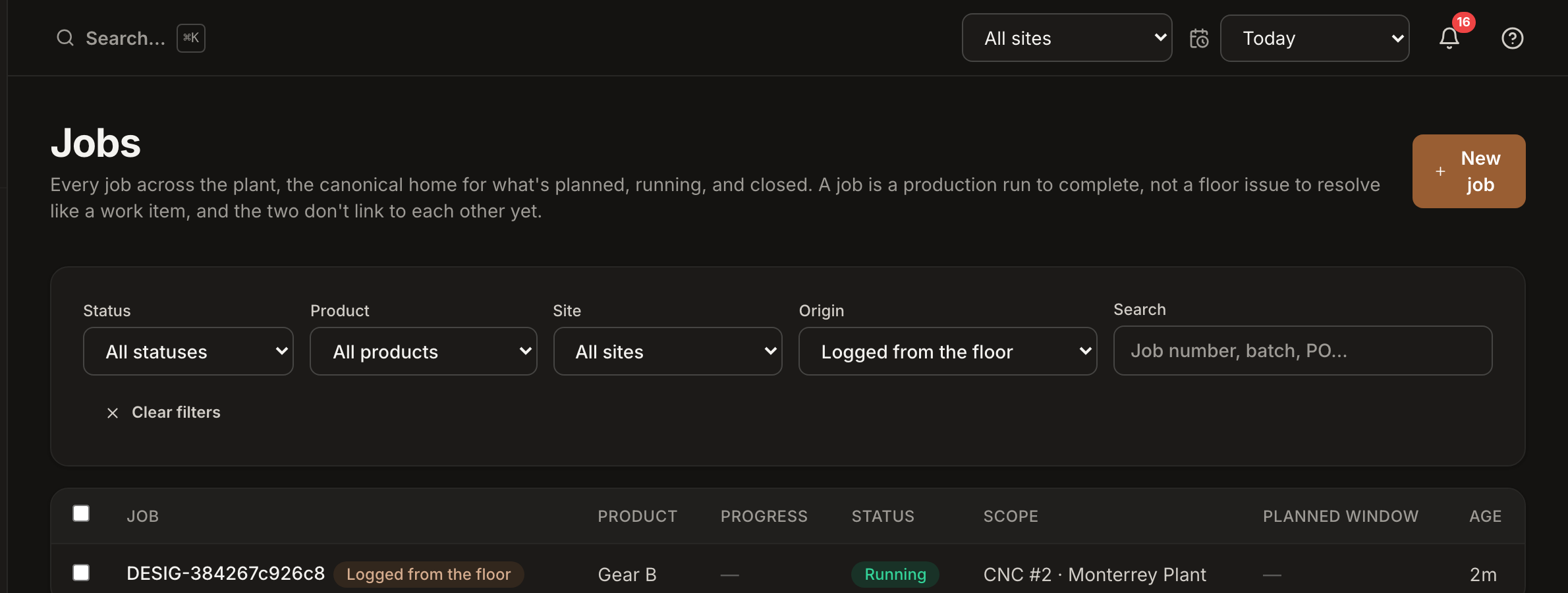
Once mapped, the next time the tag reports that value, Spall opens a Logged from the floor entry for the matching product on its own, and closes it when the tag’s value changes to something else that’s mapped. A scheduled job on that machine always wins, the automation never interrupts real work, and a manual entry an operator started by hand stays exactly where they left it, the automation won’t switch it back just because the tag kept reporting the same value it already knew about. It only acts again once the tag actually changes.
What product context buys you
None of this matters much if it stops at a label on a chart. The payoff shows up once every downtime event, every scrap tag, every cycle time reading has a product name attached instead of just a machine name. Downtime by machine tells you a press stops a lot. Downtime by product tells you it’s one specific part causing most of those stops, because the fixture for that part needs constant re-seating, which is a fixable problem instead of a vague one. Scrap by machine tells you a line runs at 94% yield. Scrap by product tells you 94% is really 99% on the easy parts and 82% on one difficult one, and that 82% is the number actually worth a meeting.
Product context turns a flat stream of events into something with a shape. Without it, every stop and every reject looks like noise from the same machine. With it, patterns show up that were always there, just invisible until something tied them to what was actually being made.
Quick recap
- A lightweight designation needs only a product name and a start and end time, not a due date or quantity
- Reserve the full work order for jobs a customer or contract actually cares about
- A designation shows up as logged from the floor, with a dash instead of a made-up target
- A program tag can drive the designation automatically once it’s mapped to a product, no tablet tap needed
- A manual entry always outranks the automatic one and never gets overwritten without the operator’s say
- Product context turns machine level downtime and scrap into patterns worth acting on