Every plant that starts tracking downtime reasons makes the same mistake in the first month: it builds too long a list. Someone sits down, thinks hard about every way a machine can stop, and comes back with sixty codes. It feels thorough. It’s the reason the data goes bad within a week.
Why more codes make the data worse
An operator coding a stop is standing at a machine, not filling out a form at a desk. They have a few seconds between the alarm and the next thing that needs their attention. Give them a list of sixty reasons and they will not read sixty reasons. They will scroll to whatever’s close to the top, or whatever they picked last time, or the generic “Other” bucket that always exists somewhere near the bottom of a long list. None of those are lies exactly, they’re just not true. The Pareto built on top of that data ranks “Other” as your biggest loss, which tells you nothing you can act on.
The fix isn’t a smarter list. It’s a shorter one. A code list a person can actually scan in under three seconds is worth more than a taxonomy that’s technically complete. Twelve well-chosen reasons beat forty overlapping ones, every time, because twelve get used correctly and forty get used as a formality.
What a good list looks like, per vertical
The right list depends on what actually breaks on your floor, which means a machining shop, a sheet metal fab, and an assembly line shouldn’t share one code list. A tooling failure is common enough on a lathe to deserve its own code. On an assembly line with no cutting tools, that same code just sits unused forever, taking up space a real reason should have.
| Vertical | A workable starting list |
|---|---|
| Machining / CNC | Setup and changeover, tool change, tool break, material short, program edit, in-process inspection, waiting on operator, planned maintenance, no demand |
| Sheet metal / fab | Setup and changeover, material load, nesting or programming, gas or consumable, jam or mis-feed, in-process inspection, waiting on operator, planned maintenance, no demand |
| Assembly / manual line | Line balance stop, component shortage, fixture or tooling issue, quality hold, changeover, waiting on operator, planned maintenance, no demand |
None of these lists has “Tooling” as a catch-all on the assembly row, and none of the machining or fab rows has “Line balance,” because those failures don’t happen there. That specificity is the whole point. A code list copied from a generic template will always have a few entries nobody ever taps, and a few real failure modes with nowhere good to go, so people force them into whatever’s closest.
A workable list runs eight to twelve codes for most cells. If you find yourself defending code number fourteen, ask what it’s actually splitting off from code number three, and whether that split matters to anyone downstream. If nobody’s going to change a schedule, a spare parts order, or a maintenance plan based on the difference, merge them.
The stops too short to ask a human about
Not every stop deserves a prompt. A three second pause while a part clears a sensor isn’t downtime in any useful sense, and asking an operator to code it trains them to stop trusting the system, because half the “downtime” it’s flagging isn’t downtime at all. The fix is a floor under which stops get handled automatically instead of interrupting anyone.
Spall grades every stop against a small ladder before it ever reaches a person:
The blip floor is fixed, roughly five seconds, and it’s the same for everyone. The other two rungs are yours to set. An ignore floor below a few seconds means those blips never get counted as downtime at all, not even automatically, because they’re not meaningfully downtime. A minor stop threshold above that catches the fifteen or twenty second pauses that are real but not worth a person’s attention, an air blast, a part re-seat, a sensor re-trigger. Those get logged as minor stops automatically, they show up in your Pareto and your event history under their own label, and they count against your availability number. Nobody had to tap anything.
Setting the minor stop threshold too high is the failure mode to watch for. If you set it to five minutes because you’re tired of coding stops, you’re not simplifying the queue, you’re hiding real downtime behind an auto-applied label nobody’s going to question. A minor stop threshold in the ten to thirty second range is usually right. A minor stop threshold measured in minutes usually isn’t.
Coding at shift end instead of stop by stop
Real downtime, the stops above the minor threshold, still needs a human reason. But that doesn’t have to happen the instant the machine stops. An operator mid cycle change doesn’t need a tablet interrupting them, and forcing a reason at the moment of the stop is exactly the kind of friction that makes people pick the fastest wrong answer instead of the right one.
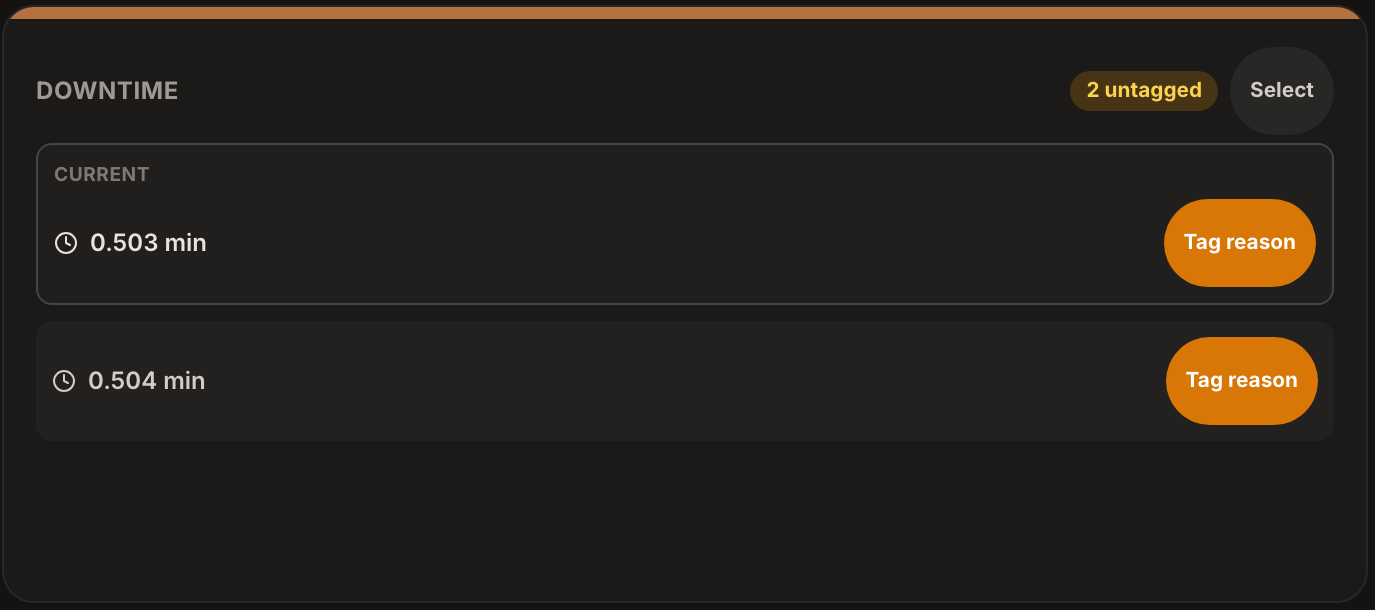
The alternative is a queue: every uncoded stop sits and waits, oldest and newest visible together, and gets coded in a batch, whenever it’s convenient instead of the instant it happens. This is the shift-end pattern that actually survives contact with a busy floor. Spall’s version of this is a good worked example of what the pattern looks like end to end. Tap Downtime on a claimed station and it opens straight into that machine’s queue, current stop pinned at the top if one’s in progress, the rest sorted with the newest first. Tag reason codes one stop at a time, or tap Select to grab several at once and apply a single reason to the whole batch, which matters when a shift’s worth of short stops all trace back to the same cause, a bad batch of stock, a fixture that needed re-seating twice an hour. One PIN entry covers the whole group instead of five.
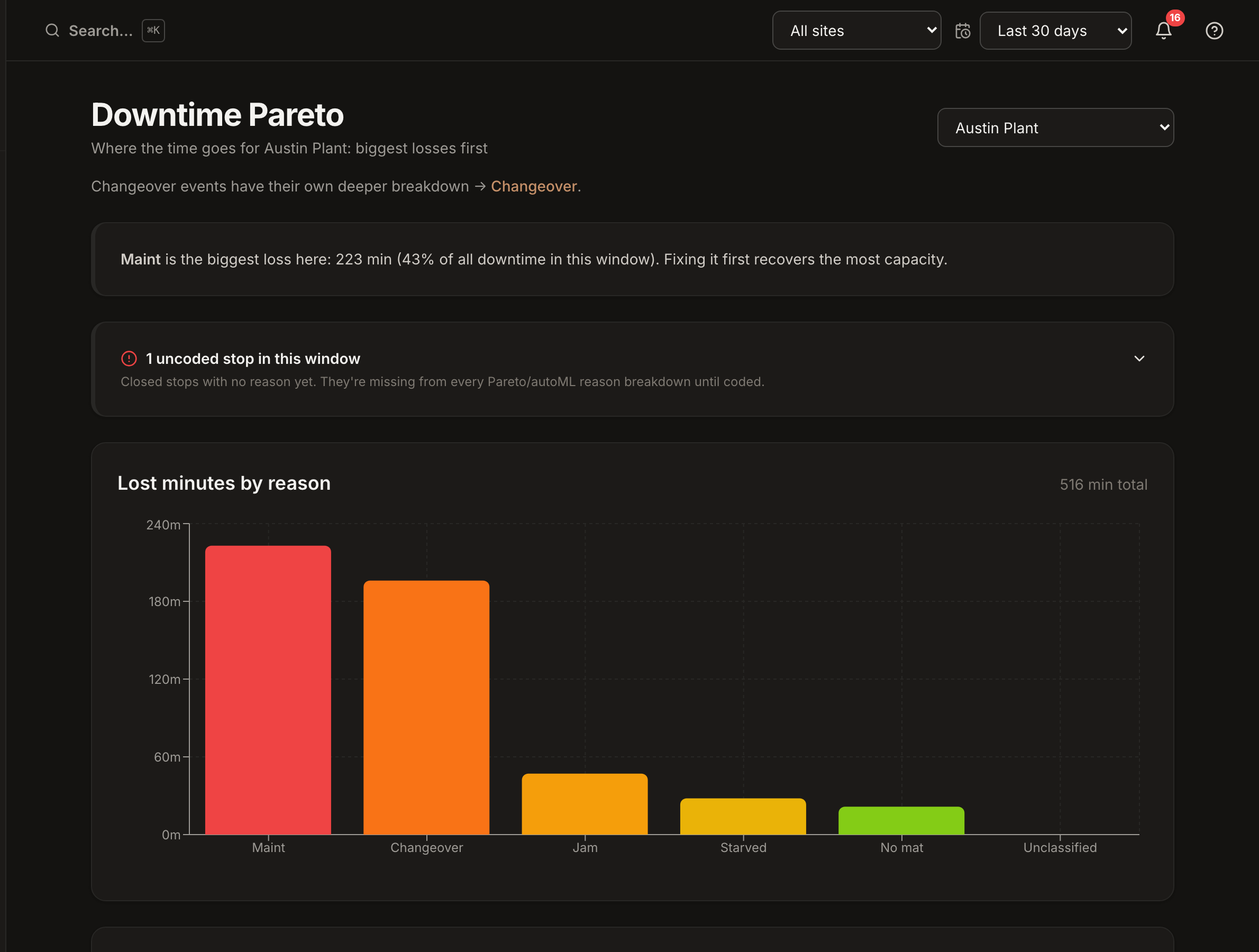
The two empty states are built to say different things. “No downtime to tag right now” and “All downtime coded” look similar but mean different things, one says nothing’s happened, the other says something happened and it’s already handled. On the admin side, a banner above the Downtime Pareto counts however many stops are still sitting uncoded, separate from the Unclassified row in the table itself, because those are two different problems: one is a stop nobody’s looked at yet, the other is a stop someone looked at and couldn’t categorize.
Coding in a batch at shift end doesn’t lose accuracy. The stop’s start and end time are already captured by the machine, all a human adds is the reason, and that reason is just as valid ten minutes later as it is in the moment, sometimes more valid, because the operator’s had time to notice the pattern rather than guessing under pressure.
Making the list survive contact with the floor
A code list isn’t done the day you write it. Revisit it every quarter or two. Pull the Pareto and look at which reasons are carrying real minutes and which have sat at zero the whole period, those unused rows are candidates to retire. Look at whatever’s landing in Unclassified or Other and ask whether it’s actually one recurring cause that deserves its own code. A list that only ever grows turns back into the sixty item list nobody reads. A list that gets pruned stays usable.
The goal isn’t a perfect taxonomy. It’s a list short enough that an operator standing at a stopped machine reaches for the right answer without thinking about it, because there are only a handful of answers and one of them is obviously true.
Quick recap
- Shorter lists get used correctly, longer lists get used as a formality
- Build the list per vertical, machining, fab, and assembly break differently
- Grade stops before they interrupt anyone: blip, ignore floor, minor stop threshold, then real downtime
- Keep the minor stop threshold in seconds, not minutes, or it hides real downtime
- Batch code at shift end, a queue beats interrupting someone mid cycle
- Prune the list quarterly, retire what’s unused, split what’s overloaded